In an emergency, almost everyone has a phone, but they do not always have a signal. When someone finds the kit’s Wi-Fi network and connects, the first thing they see is the Captive portal : a page that opens on its own. For many people, this page is the first sign that there is a team nearby. This explanation shows why it matters and what it needs to say.
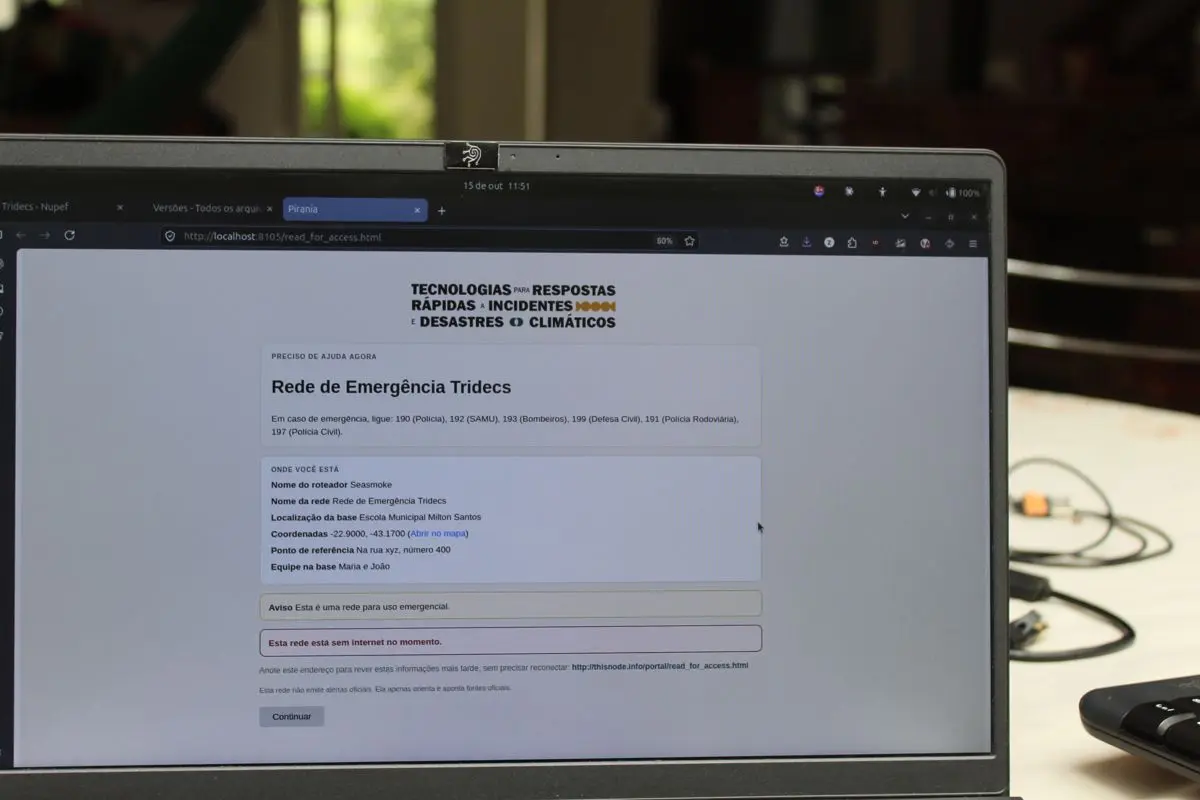
Why does this page matter so much?
People who connect to the emergency network may be frightened, low on battery and unsure of what is happening. The page appears the moment the person “joins the network”, before anything else. If it quickly says where the team is and what to do, the person gains time and direction. If it is confusing, the chance is lost.
The portal is also the part of the network that includes the people who have been affected. The kit’s other layers connect the teams with each other and with the coordination. The notice page speaks directly to the population.
Where does this portal come from?
The kit’s portal was developed by Nupef’s community networks programme, building on Pirania, the captive portal of LibreMesh . Pirania was created for community networks that share a single internet connection: it can control access with vouchers or, with that feature turned off, simply show information to people who connect.
For the emergency network, Nupef added new fields to the LibreMesh configuration form. The portal with these fields was tested in the field work in Rio Grande do Sul, on the EAP225-Outdoor access points. It worked with and without internet.
Which fields were added and why do they matter?
Each field answers a question from someone who has just connected, or from someone who needs to find the team.
| Field | Why it matters |
|---|---|
| Router name | Identifies which point of the network the person is on. It helps the team know where a request came from and find a point with a problem |
| Network name | Confirms that the person is on the emergency network and not on just any network |
| Base location | Says in plain words where the team is, for anyone who needs to reach it |
| Coordinates, with a map link | Opens the map straight on the phone. Useful for people who know how to use it and for search and rescue teams arriving later |
| Landmark | Helps people who don’t use maps: “next to the church on the square” says more than numbers |
| Team at the Base | Shows that there are people there to help (see the precautions below) |
| Notice message | Space for what the team needs to say at that moment, such as a notice that this is an emergency network or where to find shelter |
| Internet notice | Says whether that router has internet right now, so people don’t waste battery trying to load something that won’t open |
What security precautions does the portal need?
The emergency network is open: anyone nearby can connect and see the page, including people who are not there to help. So each field needs to be filled in with the reader in mind.
- Team at the Base: prefer the role to names, for example “Response team, Base”. The names of team members shown on an open network can put them at risk. Agree on this with the team before each activation.
- Do not publish the names of affected people or the addresses where they are.
- Think about the territory. In regions with land disputes or violence against community leaders, even the location of the Base and the landmark may need care.
- Replace the test data. A field left with a test value can send people to the wrong place or expose a name that should not appear.
Why work with free software?
LibreMesh and Pirania are free software, maintained by communities of developers around the world. Anyone can use, study, adapt and share these programs, without paying for a licence and without depending on a company.
This is the contribution of Nupef’s community networks programme: using and adapting open source solutions that already support community networks, instead of building everything from scratch or relying on closed products. That is what gives autonomy to community networks and, now, to emergency networks. They can be maintained, adapted and updated by people in the territory, even without internet.
Why fill it in at each activation?
The information changes with each emergency: a different place, a different team, a different landmark. In the field, the fields had test values, which need to be replaced with the real data every time the network is switched on. That is why filling in the portal is part of the kit’s activation protocol, right after switching on the power and the internet.